v1.7
1.7.0
Half a year has passed since 1.6.0 and again a new release of alphaTab with new features is available. I always hope to pace up the release cycles but it always depends on much time I can actually invest into development. After all, alphaTab is still mainly a solo project 😁
This release focused on two main areas shipping a great range of new things.
A special thing about this release is that I developed most changes during my travels this year. That's why some features might have taken a bit longer than they would have while developing focused at home. As you might expect, progress is slow if you travel through beautiful countries like Scotland , Wales and Japan. 😆
Music Notation
render: Improve SmuFL Spec Compliance
https://github.com/CoderLine/alphaTab/pull/2257
SMuFL is a specification that provides a standard way of mapping the thousands of musical symbols required by conventional music notation into the Private Use Area in Unicode’s Basic Multilingual Plane for a single (format-independent) font. https://www.smufl.org/
For years alphaTab was using the SmuFL font Bravura to render the music notation symbols. But historically a lot of the visual aspects like spacings, paddings and other arrangements were a custom development originating in the roots of alphaTab. While music sheets were generally looking good, various aspects of the SmuFL specification were not followed leading into "incorrect" display according to this spec.
With these changes we have cleaned years of accumulated customizations in layouting the music sheet bringing things closer to the spec. Not only brings this change alphaTab closer too the expected look&feel compared to other music notation software, it also allows the usage of custom SmuFL compliant fonts.
SMuFl fonts consist of two main parts:
- The Font itself holding drawing and text-layout information of the glyphs
- A separate metadata.json holding SMuFL spec specific details on sizes to use.
To activate a custom font these two things have to be provided to alphaTab. The following example shows the same music sheet with different SMuFL fonts:
In this post you can find a more direct before-after comparison.
render: Score Tempo Visibility
https://github.com/CoderLine/alphaTab/pull/2340
This feature is a side-product of the general alphaTex improvements. With this change the individual tempo change markers can be shown or hidden. alphaTab will now respect the visibility information specified in Guitar Pro files, and new a alphaTex syntax allows hiding tempo markers.
This feature can be useful if you only show small music sheet snippets on your website or in cases the information about the tempo is described differently to your users.
// this tempo is visible
\tempo 120
  C4 * 4
|
// this tempo change is invisibile
\tempo (60 hide)
  C4 * 4
|
Check out the related \tempo and tempo property syntax docs for the details.
Player
player: Midi Bank Support
https://github.com/CoderLine/alphaTab/pull/2286
With this change alphaTab now provides MIDI bank support for Guitar Pro files, MusicXML files and alphaTex. SoundFonts, used by the synthesizer, can contain multiple variations of the same instrument providing different sounds. Both the program number and the bank are now respected to select the right sounds in the loaded sound font.
If you are using special SoundFonts in your app or website, you can now benefit from these additional sounds. For the demo below we merged the Sonivox and the FluidR3Mono_GM.sf3 (MIT).
\title "Sonivox"
  \track { instrument 0 bank 0 } // bank 0 => sonivox
  \tuning (E4 B3 G3 D3 A2 E2)
  \tempo 80
  \ts 3 4
  0.4.16 (3.2 -.4) (1.1 -.4) (5.1 -.4) 1.1 3.2 1.1 3.2 2.3.8 (3.2 3.4) |
  (3.2 0.4).16 (3.2 -.4) (1.1 -.4) (5.1 -.4) 1.1 3.2 1.1 3.2 2.3.8 (3.2 3.4) |
\title "FluidR3Mono_GM"
  \track { instrument 0 bank 1 } // bank 1 => FluidR3Mono_GM
  \tuning (E4 B3 G3 D3 A2 E2)
  \tempo 80
  \ts 3 4
  0.4.16 (3.2 -.4) (1.1 -.4) (5.1 -.4) 1.1 3.2 1.1 3.2 2.3.8 (3.2 3.4) |
  (3.2 0.4).16 (3.2 -.4) (1.1 -.4) (5.1 -.4) 1.1 3.2 1.1 3.2 2.3.8 (3.2 3.4) |
alphaTex Extensions
alphaTex: Exporter
https://github.com/CoderLine/alphaTab/pull/2262
https://github.com/CoderLine/alphaTab/pull/2281
https://github.com/CoderLine/alphaTab/pull/2282
Similar to the Guitar Pro export, alphaTab can now also export the whole data model into an alphaTex document. This opens the door for a variety of use cases like:
- Providing editing capabilities for any input file (for users able to write alphaTex)
- Using alphaTex as easy-to-use exchange format.
- Saving music notation in a compact, user editable format to files or your backend.
In alphaTab 1.6 we layed the foundation with adding a lot of missing features to the language. In 1.7 we completed these efforts ensuring that all data model elements can be expressed in alphaTex allowing us to read & write all (almost) information without data loss.
In the following demo the song was loaded from a Guitar Pro file, the alphaTex code below was generated via the exporter. You can drag&drop (or double click) any custom file on top of this demo to update the file and alphaTex displayed.
alphaTex: New AST based Parser
https://github.com/CoderLine/alphaTab/pull/2339
https://github.com/CoderLine/alphaTab/pull/2340
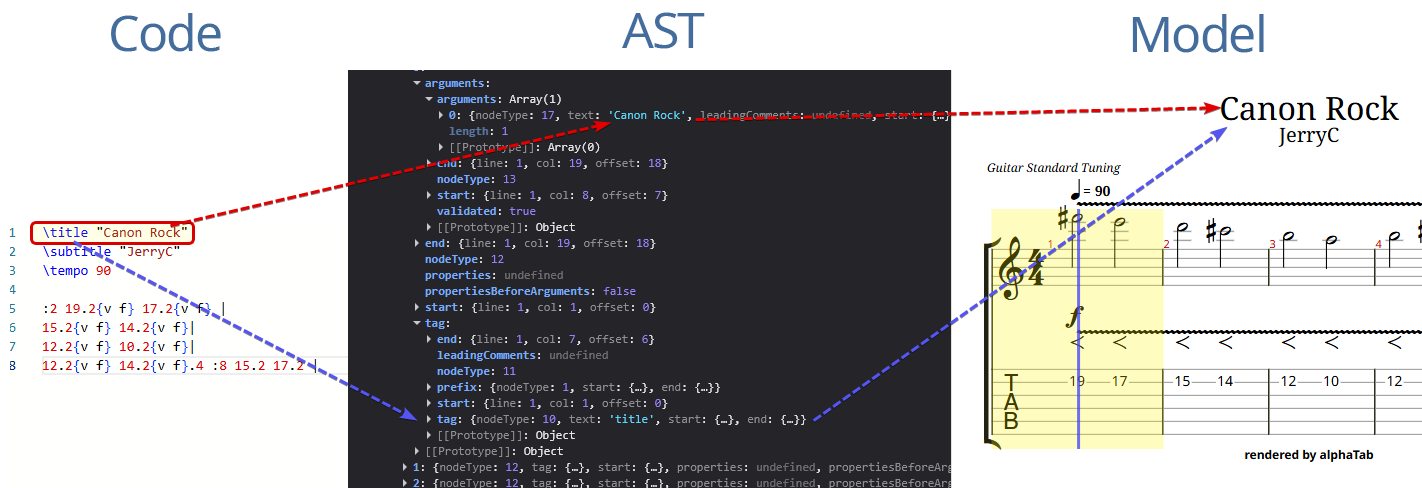
While this is a fairly technical change, it is the foundation for the other great features added in this release.
One (rather spontaneous) initiative is improving alphaTex as a language bringing it closer to the users allowing them to write alphaTex in the editors of their choice using plugins and extension you might develop.
To build new and better tooling which can provide better alphaTex writing assistence, the old importer which was reading alphaTex, was not suitable. The old importer took the input text, and tried to read it directly into the alphaTab data model. It provided some basic error information if something in the alphaTex code was invalid.
The new parser is closer to what you might have seen from programming/scripting languages like TypeScript, C# or Python. Borrowing aspects from the compiler construction alphaTab has now a separate lexer, parser (compiler frontend) and importer (compiler backend).
- The lexer and parser translate alphaTex code, into a tree structure holding detailed information about where in the code which element is described: an abstract syntax tree (AST). For experts under you: It is close to a concrete syntax tree as it holds information about punctuation and comments, but it does not retain any whitespace information.
- The importer then translates this AST into the alphaTab data model.
- In any phase the components might report diagnostics (warnings, errors, hints) for document ranges.
During this rework we noticed a range of potential improvements which directly landed in the new parser.
alphaTex was a rather "loose" language, having some language constructs defined, but not used consistently. Now alphaTex has more clearly defined how elements are described and values are specified. The details are now documented in the new language documentation.
Two key changes in the language, compared to 1.6, are:
- The documents do not need to be separated with dots into 3 sections anymore. See Document Structure.
- Metadata tags and properties now follow more a function call approach where values are passed as arguments into them. Single values do not need parenthesis but multiple values should be wrapped. See Parameters.
alphaTex: Language Server and Monaco Integration
https://github.com/CoderLine/alphaTab/pull/2379
To provide the best end-user experience for alphaTex, having some sort of editor assistence is the key. Having only a plain textbox, makes it hard to write alphaTex correctly and efficiently.
Language Server
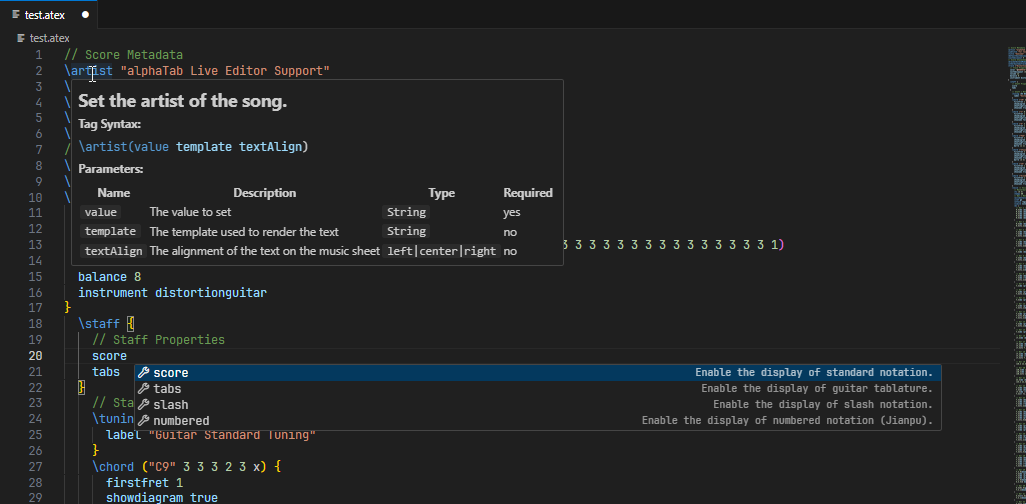
Many years ago, Microsoft invented a protocol named "Language Server Protocol" (LSP) which defines a unified way, how (programming/scripting) language authors, can provide additional editor features to text and code editors like Visual Studio Code.
With having the new language parsing capabilities in place, creating a language server was the next logical step.
https://www.npmjs.com/package/@coderline/alphatab-language-server
Long-story-short: This module provides advanced capabilities to LSP compatible editors including:
- Syntax Highlighting via a TextMate grammar giving the elements different colors like when writing code.
- Showing diagnotics like warnings and errors in the editor
- Hover documentation showing the documentation about the alphaTex language elements
- Code completion providing contextual items
- Signature Help for values that can be passed to metadata tags and properties.
Learn more in-depth about this feature here
Monaco Integration
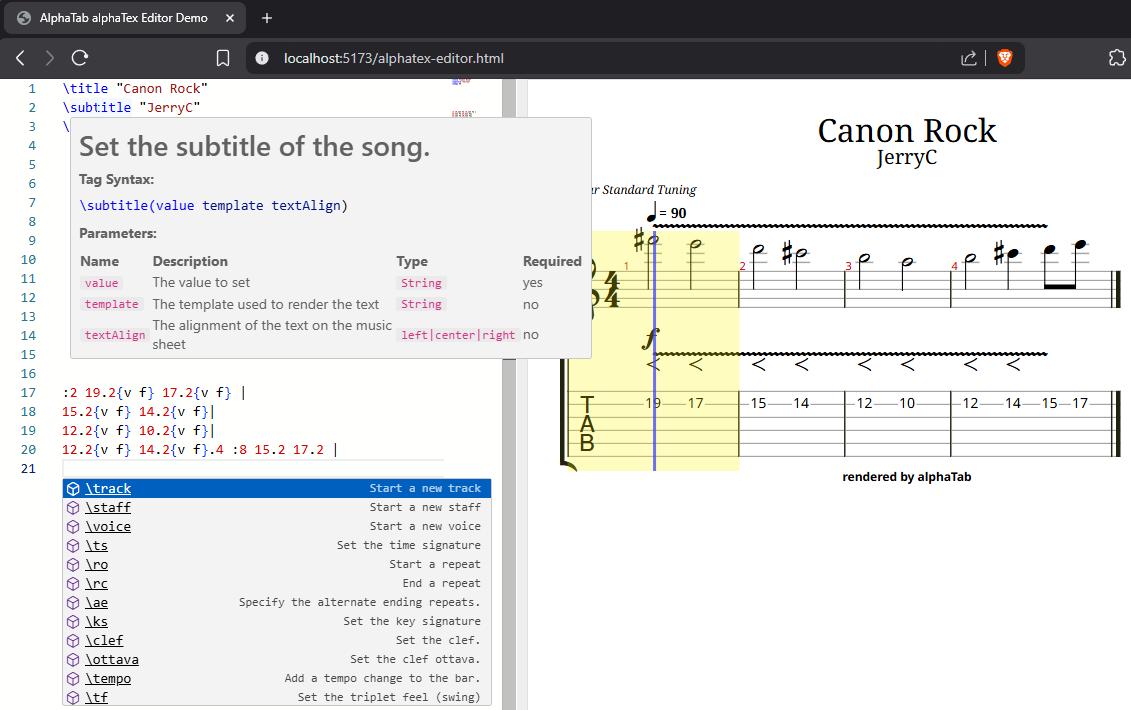
Monaco is the code editor used in Visual Studio Code. It provides advanced editor capabilities allowing you to integrate an advanced code editor into your web application.
Unfortunately Monaco itself does not have built-in support for the Language Server Protocol but it provides its own (very similar) API for integrating those parts.
To make it easier to use the alphaTex language server together with Monaco in your app we created an own basic LSP integration. With this integration you can spawn a language server as a web worker, and connect it to your Monaco editor providing a rich editing experience with all features like you would expect from a code editor.
We also use this integration now in the alphaTex editor of the development playground.
Learn more in-depth about this feature here
alphaTex: VS Code Extension (prototype)
https://github.com/CoderLine/alphaTab/pull/2379
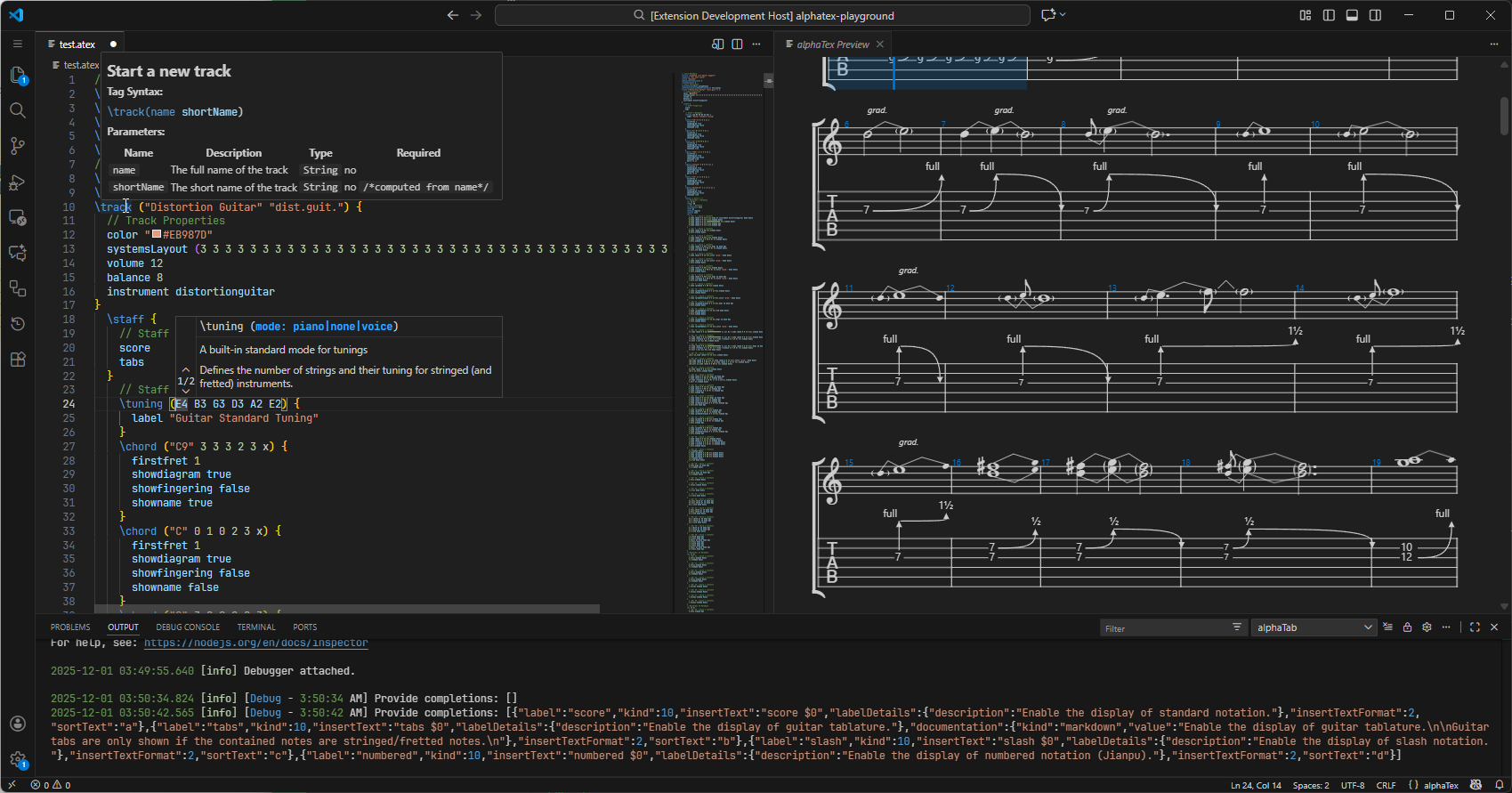
To develop and test the language server we created a basic Visual Studio Code extension allowing you to write alphaTex right within this IDE. It provides all editor capabilities you'd expect and even a live preview of the music notation you write.
Up to now this extension is more of an experiement or proof-of-concept. In its state it is not intended to be really a product that we maintain and provide alphaTab as end-user feature via a VS Code Extension.
This goal might change in future when alphaTab aims to ship own apps, not "only" an SDK.
Guitar Pro Extensions
guitarpro: adjust key signature to match "c played as"
https://github.com/CoderLine/alphaTab/pull/2283
alphaTab now respects correctly the setting C played as configurable for every track in Guitar Pro.
This setting serves special transposition needs for instruments. alphaTab now also adjusts the key signature
of the track according to this setting.
Improvements & Bugfixes
alphaTex: Tenor and alt clef swapped
https://github.com/CoderLine/alphaTab/pull/2282
A simple but significant problem existed in alphaTex since a long time. alphaTab mapped clef names wrongly. alphaTab has some aliases for the same clef which were incorrectly handled:
| alphaTex | Old wrong clef | New correct clef |
|---|---|---|
\clef tenor | Clef.C3 | Clef.C4 |
\clef alto | Clef.C4 | Clef.C4 |
\clef tenor C4 | \clef alto C4 | \clef C3 C4 | \clef C4 C4
development: Monorepo Setup
https://github.com/CoderLine/alphaTab/pull/2304
The git repository of alphaTab was reorganized to follow a more common monorepo structure known from web projects. As we grow in the NPM and other packages we ship, the old structure was not suitable anymore.
The individual modules are now nested into the packages folder using NPM workspaces.
Some common configurations have been extracted for easier use across all packages we produce.
The new structure now allows better code sharing and producing a variety of different outputs as needed by the individual package.
At this point alphaTab is not using any special mono repo tooling like Lerna or NX but we rather have our own set of scripts and try to keep things simple. The toolchain we have with Vite and our transpiler is already complex enough to handle. We don't need even more tools and dependencies just to build alphaTab.
build: Toolchain modernization
https://github.com/CoderLine/alphaTab/pull/2349
On top of the monorepo reorganization we also extended a bit the tooling and building of alphaTab. Some also have an impact to the consumer side of alphaTab:
ES2022 output
We decided to upgrade our compilation to EcmaScript2022. This allows using some new browser APIs which are already supported in all major browser.
Naming Convention Linting and Private Name Mangling
We activated some naming convention checks in our linter (Biome) and all private members are now prefixed with an underscore _.
Additionally when we are producing our minimized outputs .min.mjs we also mangle the names of these private members.
This has the benefit of reduced code size as the member names can be shorted.
If you were using private members of alphaTab classes and APIs, you might need to update your code. You will need to use the unmangled versions to avoid naming mismatches on updates if you still want to access the private members and you have to update the member names.
If you are using private APIs, we recommend to rather open a request to expose APIs in future releases for your needs.
Snapshot Testing
Historically we had written a lot of manual test assertions in our unit tests. For the visual regression tests we already used snapshot testing where a golden reference image is checked against new outputs.
Now we also have support for such tests for other data objects. While we use jest-snapshot as a base there, only limited assertions are actually available. As we also need to be able to run the tests in C# and Kotlin, we cannot just pass any special object in and expect things to work.
But we created a variety of custom serializers that allow easier testing against snapshot references instead of writing manual checks.
Website
search: Use Algolia Search
https://github.com/CoderLine/alphaTabWebsite/pull/150
We decided to move from the "offline search" to Algolia for our search box on the website to provide better search results pointing to the pages you are actually looking for.
We might still need to fine tune the search results over time.
Dark Mode (experimental)
I personally use dark mode almost everywhere on my devices, but still alphaTab remained a bright white counterpart to that. Not only does this attract software bugs, I was against actual mosquitos while developing alphaTab in the evenings. 🦟🤪
At some point I simply activated the dark-mode switcher of Docusaurus again and tweaked a range of styles to make the website available in a dark mode. Some pages and demos still need fine-tuning.
Test it live on the top right.
alphaTex: New generated documentation
https://github.com/CoderLine/alphaTabWebsite/pull/153
With all the changes to alphaTex a new documentation was needed too. Especially as the alphaTex documentation is also needed in the language server to provide documentation hovers and code completions, maintaining it manually on the website didn't seem feasible anymore.
Instead most of the refeference documentation listing all metadata tags, properties etc. is now auto-generated from the central language definition of alphaTex.
Thanks to this, the documentation will automatically update as we also add new features to the code. Reducing the effort and mitigating the risk of the documentation being outdated.
The documentation might appear a bit more technical now, but once you get the hang of how to read and use things, looking up information will be a lot easier than before.
Head over to the new documentation pages to see the result.