Monaco Editor Integration
Monaco is the code editor that powers Visual Studio Code providing advanced coding capabilities. Unfortunately Monaco has no built-in support for language servers but ships its own APIs.
You can opt for advanced integrations like https://github.com/TypeFox/monaco-languageclient or rely on this more lightweight integration we ship in @coderline/alphatab-monaco
This package allows integrating Monaco with the alphaTab language server running in a Web Worker providing all its capabilities.
This guide here focuses on the integration with Monaco in a browser environment. We also assume that the dependencies imported are available through some mechanism like bundlers.
This integration is still experimental. It works fine with a single editor on the page but it has not yet been well integrated into more complex environments with multiple editors.
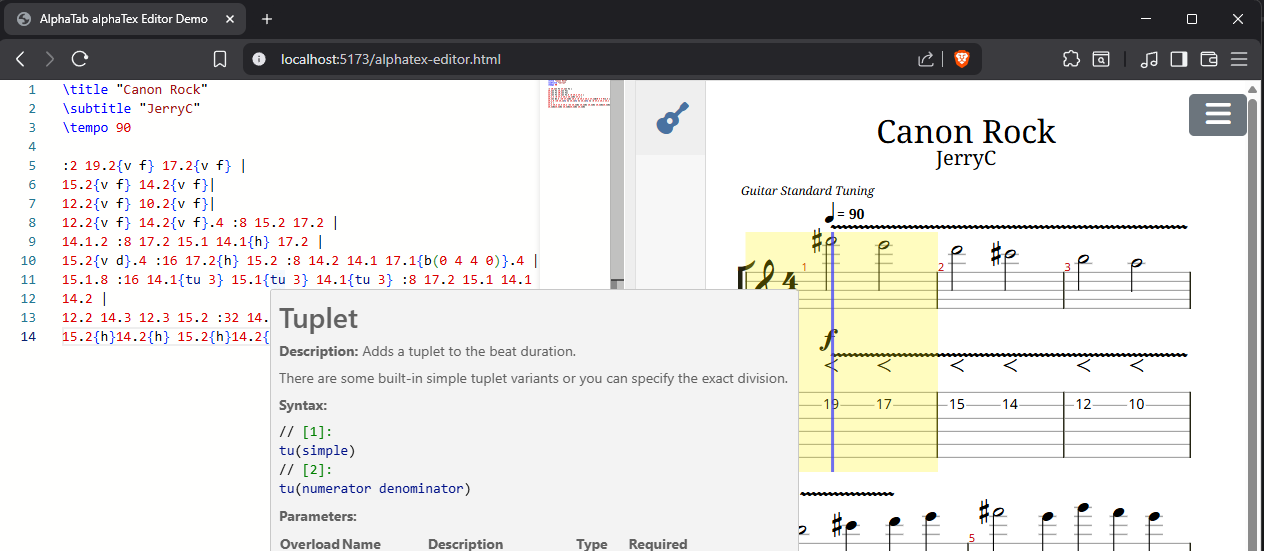
We also use this module in our development playground. You can check out and test things by cloning alphaTab and opening it in VS Code (it will compile and start the playground).
Then open the alphaTex Editor in the menu.
TextMate grammar
alphaTab ships a TextMate grammar, but Monaco does not support TextMate grammars out-of-the-box. We use two packages from Microsoft bridge this gap:
vscode-textmateManages the loading of TextMate grammarsvscode-onigurumaIs the engine for Oniguruma Regular expressions used in TextMate grammars (via WebAssembly).
//
// Monaco editor worker (see Monaco docs)

// @ts-expect-error
import editorWorker from 'monaco-editor/esm/vs/editor/editor.worker?worker';
self.MonacoEnvironment = {
    getWorker: () => {
        return new editorWorker();
    }
};

//
// alphaTex Grammar Support

// load the WebAssembly file (e.g. via ajax or other mechanisms)
// it is shipped together with the vscode-oniguruma NPM package
const onigurumaWasm:ArrayBuffer = await load(new URL('vscode-oniguruma/release/onig.wasm', import.meta.url));

import { addTextMateGrammarSupport } from '@coderline/alphatab-monaco/textmate';

// Setup general textmate grammar support (also other grammars beside alphaTex could be used)
const textMateSupport = addTextMateGrammarSupport(onigurumaWasm);

// Register the alphaTex grammar
await registerAlphaTexGrammar(textMateSupport);

//
// Setup editor
import * as monaco from 'monaco-editor';
const element = document.querySelector<HTMLElement>('#editor');
const editor = monaco.editor.create(element!, {
    value: '\\title "Hello World"',
    language: 'alphatex',
    automaticLayout: true
});
At this point you should get an editor with syntax highlighting.
Starting the language server
To get the remaining capabilites into Monaco, we first have to launch the alphaTex language server in a web worker.
The NPM package provides a module which can be spawned as web worker:
const lspWorker = new Worker(new URL('@coderline/alphatab-monaco/worker', import.meta.url));
Alternatively you can also create an own worker file in your project and start the language server:
// Variant 1
import '@coderline/alphatab-monaco/worker';
// Variant 2:
import { startWebWorkerLanguageServer } from '@coderline/alphatab-language-server';

const workerGlobalThis = globalThis as unknown as DedicatedWorkerGlobalScope;
startWebWorkerLanguageServer(workerGlobalThis, workerGlobalThis);
const lspWorker = new Worker(new URL('./lsp.worker.ts', import.meta.url));
Setup the Monaco LSP Integration
Integrating with this LSP worker is quite simple. Simply call setupLspAlphaTexLanguageSupport.
//
// Monaco editor worker (see Monaco docs)

// @ts-expect-error
import editorWorker from 'monaco-editor/esm/vs/editor/editor.worker?worker';
self.MonacoEnvironment = {
    getWorker: () => {
        return new editorWorker();
    }
};

//
// alphaTex Grammar Support

// load the WebAssembly file (e.g. via ajax or other mechanisms)
// it is shipped together with the vscode-oniguruma NPM package
const onigurumaWasm:ArrayBuffer = await load(new URL('vscode-oniguruma/release/onig.wasm', import.meta.url));

import { addTextMateGrammarSupport } from '@coderline/alphatab-monaco/textmate';

// Setup general textmate grammar support (also other grammars beside alphaTex could be used)
const textMateSupport = addTextMateGrammarSupport(onigurumaWasm);

// Register the alphaTex grammar
await registerAlphaTexGrammar(textMateSupport);

//
// Setup editor
import * as monaco from 'monaco-editor';
const element = document.querySelector<HTMLElement>('#editor');
const editor = monaco.editor.create(element!, {
    value: '\\title "Hello World"',
    language: 'alphatex',
    automaticLayout: true
});

//
// Setup the LSP support
import { addTextMateGrammarSupport } from '@coderline/alphatab-monaco/textmate';
await setupLspAlphaTexLanguageSupport(editor);
We noticed some strange Vite behaviors when spawning workers in our development playground. Strangely Vite did not actually bundle the dependencies included in the worker leading to problems that the language server is not started. We had to create an additional wrapper script which then imports the worker.